Windows software · Lifetime license · 7-day free trial
Any song, with lyrics that light up in time.
Vocaloom™ removes the vocals from a song, syncs the lyrics word by word and creates your MP4 video to sing along and practice. Everything happens on your PC: no subscription, no cloud, no catalog to depend on. Your songs never leave your computer.
- One-time payment, no subscription
- Processed locally, even without internet*
- Singing Training included
- Interface in English and Italian
* Internet is only needed to download the software, activate the license and, on first launch, download the AI models (about 600 MB). After that the software works locally; it occasionally rechecks the license when a connection is available.
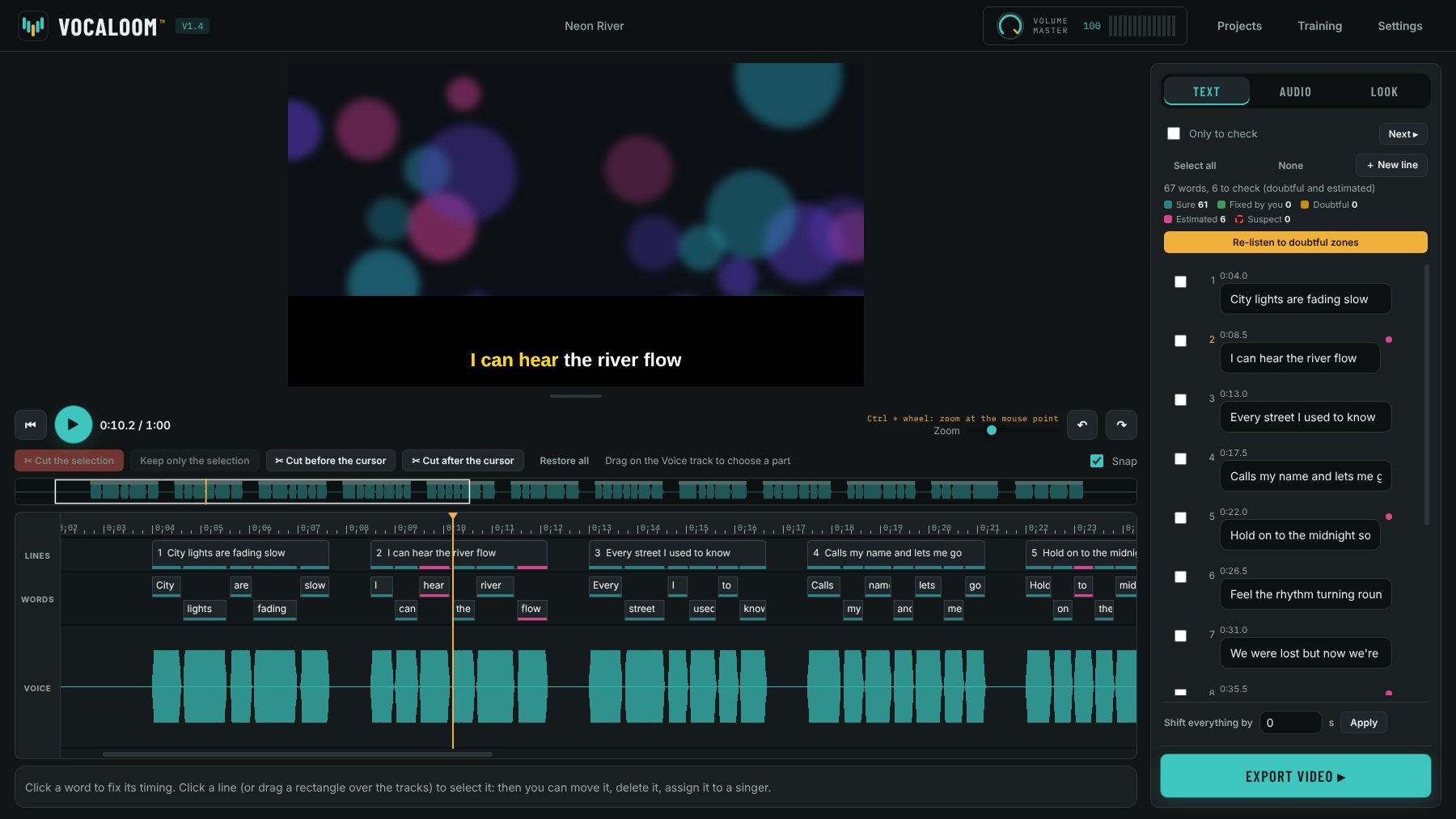
Demo video
See Vocaloom™ at work
From the original song to the finished video, on a real track, with no cuts.
The demo video is coming soon
Why it exists
The backing track you need often doesn’t exist
If you sing, you know the feeling: you want to practice a specific song, maybe your own unreleased track, a special arrangement or a little-known song, and you can’t find a backing track with synced lyrics online. Or you find one, and the quality is poor.
With Vocaloom™ you make your own, starting from the files you already have. You bring the song and the lyrics, the software does the rest. And whatever isn’t perfect, you fix yourself, word by word.
How it works
Three steps, from song to video
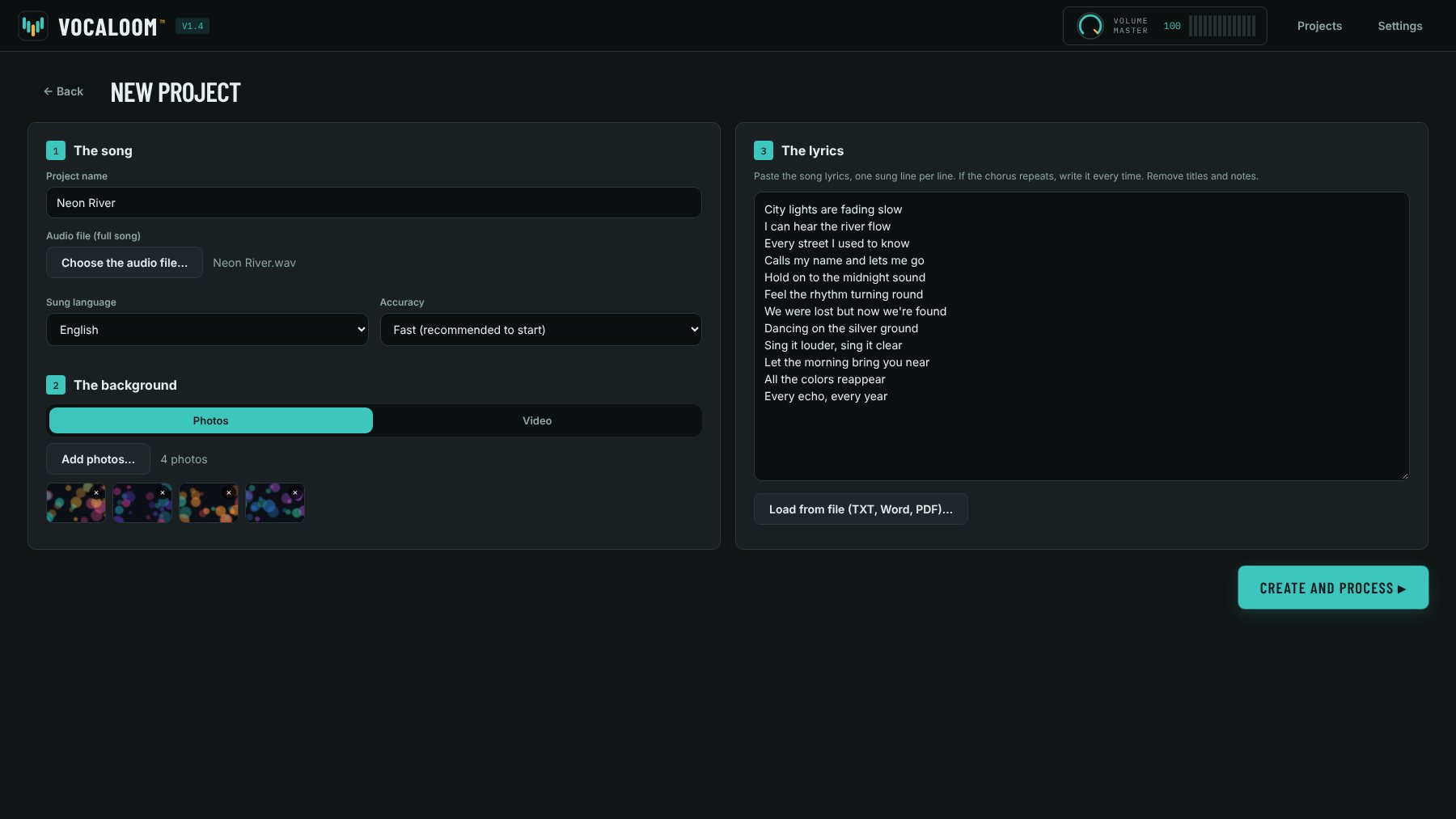
Load song, lyrics and background
Pick the audio file of the full song (MP3, WAV, FLAC and other common formats), paste the lyrics or load them from a TXT, Word or PDF file. For the background, use your own photos in sequence or a video.
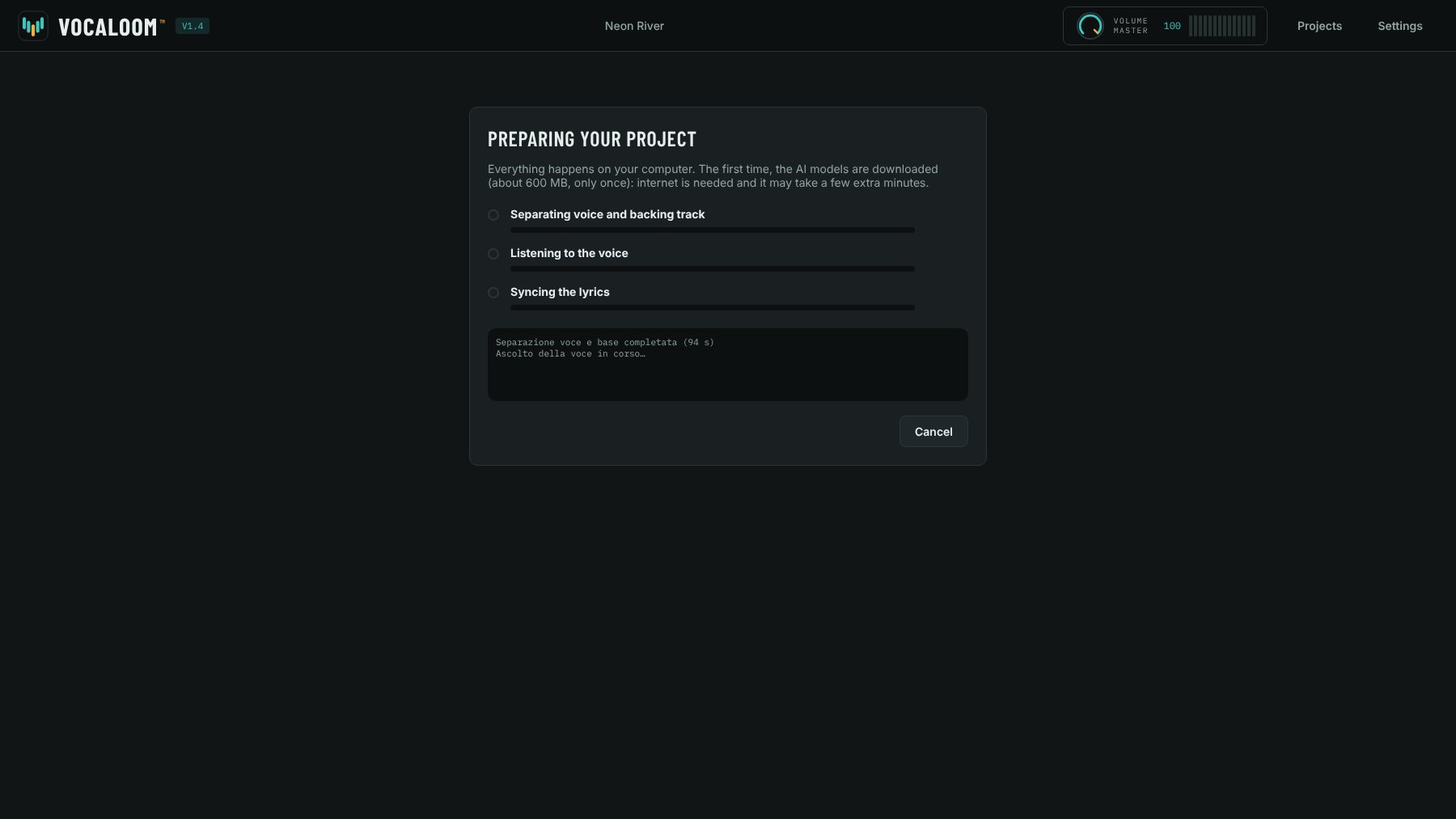
Vocaloom™ separates and syncs
The software separates the vocals from the backing track, listens to the singing and places every word of your lyrics at the right moment. It all runs on your computer, with local artificial intelligence.
Usually a few minutes per song, depending on your PC
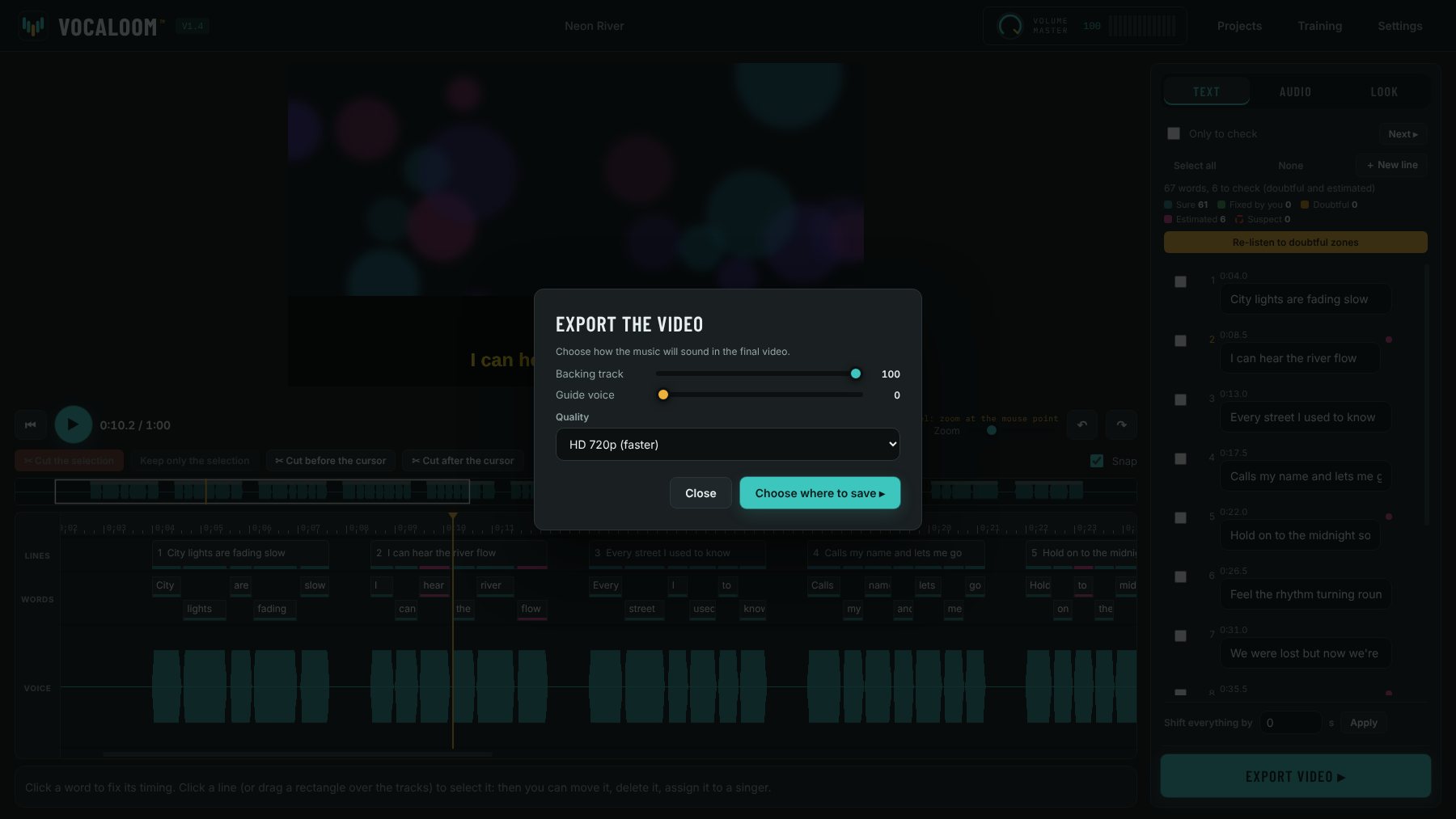
Check, fine-tune, export
Watch the preview, fix the words flagged as doubtful, choose text colors and size, and create your MP4 video in HD or Full HD. You can also keep the original vocals in the background, at the volume you like.
Features
Everything you need to sing your song
Vocals and backing, separated
Removes the vocals and keeps the backing track. The original vocals stay available as a guide, with their own volume from 0 to 100.
Synced lyrics
Each word lights up as it is sung. Uncertain words are color-flagged, so you know right away where to look.
Precision timeline
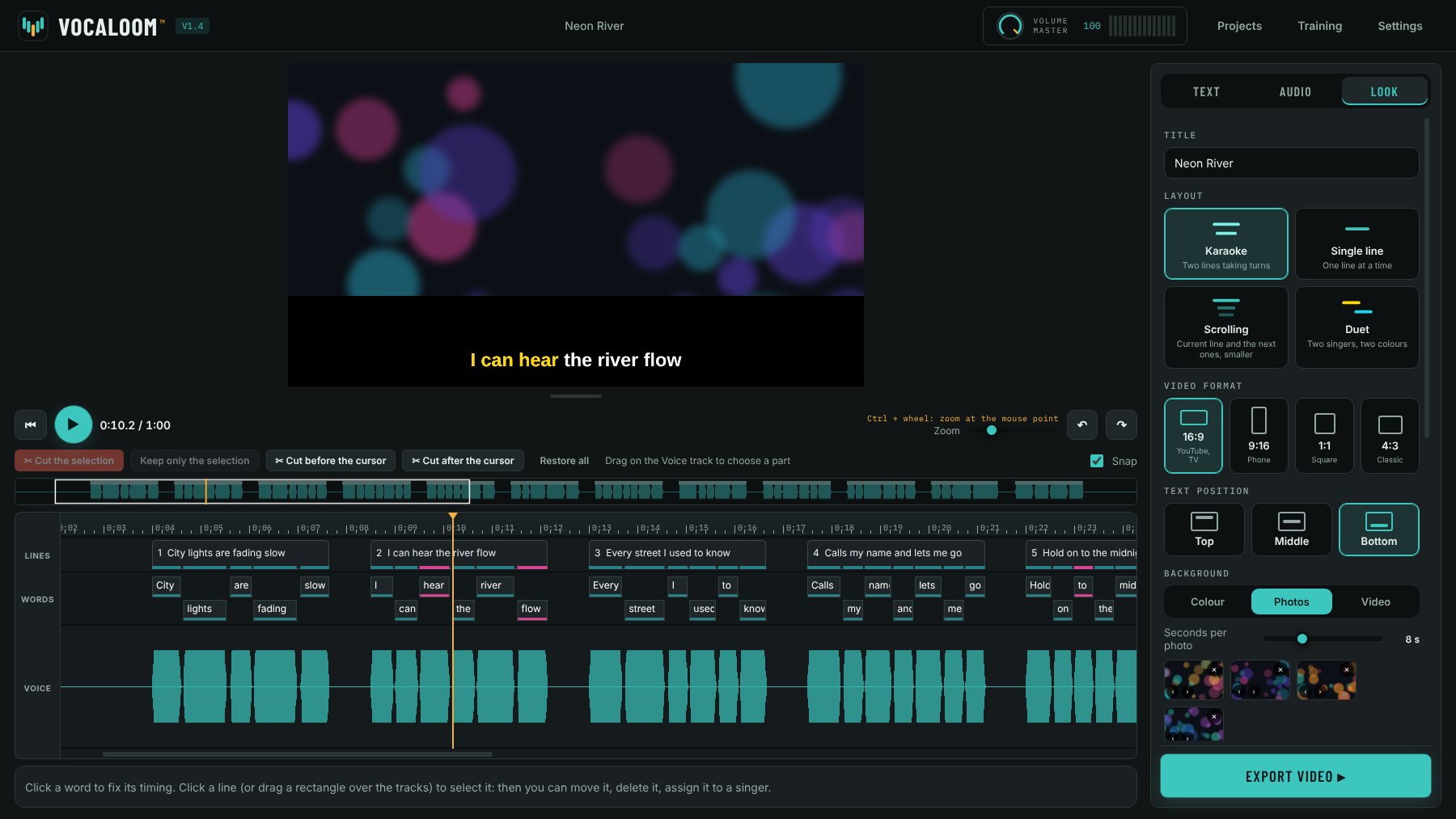
Lines, words and the vocal track stacked together. Move, stretch, delete and undo, like in a video editor.
Key from −6 to +6
Raise or lower the song by up to six semitones and hear it right away, to fit your vocal range.
Duets
Assign each line to singer A, singer B or both, in different colors. In the video you can mute one of the two parts.
Photo or video background
Your photos play in sequence behind the lyrics, or pick a video and the point where it starts.
Lyrics your way
Your choice of text and highlight colors, adjustable size, optional band, next lines shown in advance and a countdown after pauses.
Trim the song
Remove an intro that runs too long or a solo: cut a part, keep only the selection, or cut before and after the cursor.
Full HD MP4 or MOV video
Export in HD 720p or Full HD 1080p and choose how loud the backing and guide vocals are in the final video.
New in version 1.4
You decide how the lyrics look
One panel to choose how your video should look, with no hidden menus.
Four layouts
Two-line karaoke, single line, scrolling with the next lines smaller (great for rap) and duet with one color per singer.
The right format
16:9 for YouTube and TV, 9:16 for phones, 1:1 square and 4:3 classic. The video adapts, preview included.
Position and font
Lyrics at the top, middle or bottom, three fonts to choose from and a line transition that slides, fades or does nothing.
Color, photo or video background
Ready-made gradients or two colors of your choice, or your photos, or a video.
MP4 or MOV
Export in HD 720p or Full HD 1080p, in the format you need.
Smoother Training
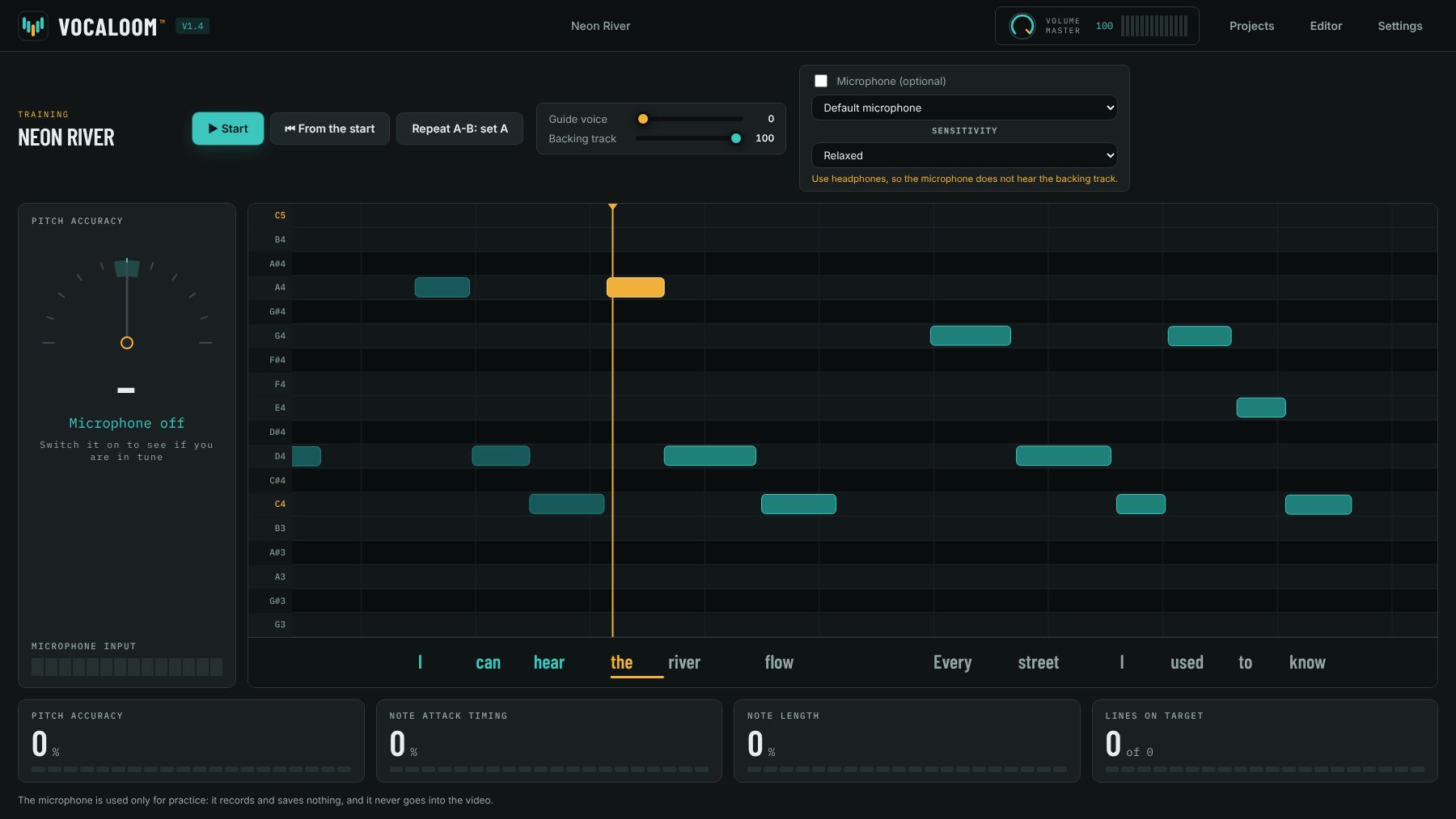
The pitch line and needle are less jumpy and have an adjustable sensitivity: Relaxed, Normal or Precise.
Included in the license
Training: see the melody as you sing
A piano roll shows the notes of the original vocals, extracted from the song. Follow the line, repeat the hard parts and, if you like, turn on the microphone to see if you are in tune.
- The note to sing lights up in real time, with the lyrics underneath
- A-B loop to practice a single passage
- Separate volume for guide vocals and backing track
- Optional microphone: shows pitch, timing and note length, without recording or saving anything
On your computer
Your songs stay yours. Wherever you are.
Vocaloom™ works entirely locally: no song, lyric or photo is ever uploaded to a server. It is a choice for the privacy of those who write and perform music, unreleased songs included. And it means freedom too: once installed, you can study, fix and create your videos in the rehearsal room, up a mountain, in the woods with no signal.*
No online uploads
Songs, lyrics and photos never leave your PC. The artificial intelligence runs on your computer, not in someone else’s cloud.
Works without a network*
After installation and the first launch, you don’t need a connection to work on your songs.
No cost per song
No credits, no monthly limits, no cloud storage to fill: files stay on your disk, and you can create as many as you like.
* Internet is only needed to download the software, activate the license and, on first launch, download the AI models (about 600 MB). The software rechecks the license from time to time when a connection is available. For the license only an anonymous computer code is sent, never your files.
Who it’s for
Made for singers, and for those who teach them
Price
Buy it once, it’s yours
No subscription, no credits. Many online karaoke services cost from about 10 to about 30 dollars per month.*
Lifetime license · up to 2 Windows PCs
Launch price
Launch price for 30 days from launch or for the first 100 licenses, whichever comes first. After launch the price will be €65. Those who buy at launch keep their license for life.
- All features, no limits on length or number of projects
- Training mode with piano roll and optional microphone
- Version 1 updates included
- Single installer: installs like any other program
- Personal license key by email, right after purchase
Secure payment through Lemon Squeezy. Vocaloom™ is digital content: at checkout we will ask you to agree to immediate delivery and to acknowledge that, once you download the software or activate the license, you lose your right of withdrawal (EU Directive 2011/83, art. 16). The legal guarantee of conformity always applies. Please check the requirements before buying.
* Prices seen in November 2026 on the public websites of some subscription services; they may change.
Try it free for 7 days
Download the trial version: it has every feature, with videos up to 1 minute 30 per song. If you like it, enter your license key and the trial limit goes away.
Requirements
- System
- Windows 10 or 11, 64-bit
- Memory
- 8 GB RAM, 16 GB recommended
- Disk
- At least 5 GB free
- Graphics card
- Not required
- Internet
- To download the software and, on first launch, the models*
Using a Mac?
The macOS version is on its way. Leave your email and we’ll let you know when it’s ready.
Frequently asked questions
Before you buy
Which computers does it run on?
PCs with Windows 10 or 11, 64-bit. The Mac version is in the works: leave your email in the Price section to be notified.
How long does it take to prepare a song?
It depends on your computer and the length of the song. On a PC a few years old, a 3-minute song usually takes 4 to 5 minutes, without a dedicated graphics card. You can do other things meanwhile.
Do I need an internet connection?
To download the software and, on first launch, the AI models (about 600 MB, once). After that you can work without internet; the license is rechecked from time to time when a connection is available.
Is it karaoke software?
It does what karaoke software does, and more: besides the video with synced lyrics you get vocal separation, key change, duets and Training mode to study the melody.
Which files can I use?
Audio: MP3, WAV, FLAC, M4A, OGG, AAC, WMA, OPUS. Lyrics: copy and paste, or TXT, Word (DOCX) or PDF files. Backgrounds: JPG, PNG, WEBP or BMP photos, or an MP4, MOV, MKV or other common video.
Which sung languages does it recognize?
English, Italian, Spanish, French, German and Portuguese, or let it detect the language automatically. The interface is in English and Italian.
Can I use my own tracks or home recordings?
Yes. That’s one of the reasons Vocaloom™ exists: your own unreleased song, a recording with your teacher, your own arrangement.
Does Vocaloom™ download music from the internet?
No. It only works on files already on your computer that you choose. It doesn’t download songs from websites or platforms.
Can I publish the videos I create online?
Vocaloom™ is designed for personal and educational use. Songs belong to their authors: publishing a video with a copyrighted song requires permission from the rights holders. With your own original songs, it’s up to you.
How does the free trial work?
You have 7 days to try every feature. During the trial, listening and videos are limited to 1 minute 30 per song. Enter your license key to remove the limit.
Are my files uploaded anywhere?
No. Songs, lyrics, photos and videos stay on your computer. For the license the software only sends an anonymous computer code.
What happens after I pay?
You immediately receive an email with the installer download link and your personal license key. Enter it on first launch and the software is activated.
Windows shows a warning when I start the installer. Is that normal?
Yes, the blue Windows SmartScreen window may appear, as it does for software from independent developers that isn’t widely installed yet. Click “More info” and then “Run anyway”.
Can I get a refund?
Since this is digital content, the right of withdrawal ends when you download the software or activate the license, after you gave your consent at checkout. If the software doesn’t work as described on a PC that meets the requirements, write to us: the guarantee of conformity still applies.
Bring your song, Vocaloom™ does the rest
Launch price €37.50, once. No subscription, no limit on songs.